Mac mini (M4) vs iMac (M4): Which Home Office Mac to Buy
Both home office Macs run the M4 chip, but one is a tiny box you plug into your own screen and the other is a complete computer with a 24 inch display built in. The right choice depends on your desk, not the chip.
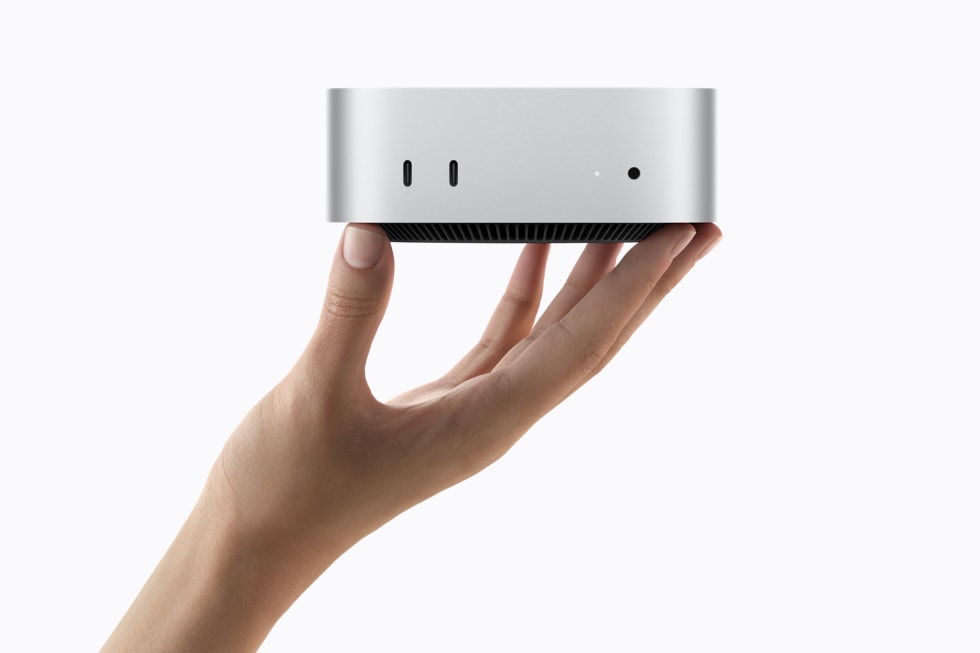
Both of Apple's home office desktops now run the M4 chip, so the chip alone cannot settle the choice. The real decision is about your desk. The Mac mini (M4) is a tiny desktop computer, just 5 by 5 inches, that you plug into a display, keyboard and mouse you already own or buy separately. The iMac (M4) is the all-in-one alternative: a complete computer with a 24 inch 4.5K Retina display built in, in seven colors. Same M4 power, two very different ways to set up a home office.
Price is the first difference, and it needs honest accounting. The Mac mini (M4) starts at $599 at the Apple Store, as listed on its product page here. The iMac (M4) starts at $1,299 at the Apple Store. That is a $700 gap on paper, but the mini price is not the whole setup cost. If you already own a good display, keyboard and mouse, the mini stays far cheaper and the gap is real. If you own none of those, add their cost to the mini before comparing, because the iMac price already includes its display, keyboard and mouse in the box. Do that honest total first, and the comparison becomes fair.
Best deal check
Get the best deal on Mac mini (M4)
Live store prices and real discounts, checked against the official Apple Store price. Tap a store to see the current deal.
The desk footprint tells the same story in physical form. The mini is a small square box that disappears under a monitor, on a shelf, or behind a desk. It suits small rooms, shared desks and anyone who wants the computer itself to be invisible. The iMac is a single elegant unit: screen and computer in one slim panel on a stand. It suits a dedicated desk where you want one clean object instead of a box plus cables plus a separate screen. Neither is objectively tidier; the mini hides the computer, while the iMac removes the separate screen and its cables.
Performance is closer than the price gap suggests, because both machines run the M4 chip. For the work a home office actually involves, such as documents, spreadsheets, video calls, browser tabs, email and light photo editing, both are far more than fast enough, and you will not feel a difference between them. The mini product page describes it as the best value in the Mac lineup, and that is a fair summary: it gives you M4 power at the lowest entry price Apple offers for a desktop. The iMac gives you the same class of M4 power wrapped in a display-first design, and its value is in the screen and the simplicity, not in extra speed.
The display is where the iMac earns its premium. Its 24 inch 4.5K Retina display is sharp, bright and color accurate for documents, video calls and creative work, and it is calibrated and matched to the machine by Apple. With the mini, the display is your choice, which is both a freedom and a responsibility. A good display can match or beat the iMac screen, and you can choose the size that fits your desk, from a compact monitor to a large ultrawide. A poor display will hold back an otherwise excellent computer. If choosing a monitor sounds like a chore, the iMac removes that decision entirely. If you already love your monitor, or you want a specific size the iMac does not offer, the mini lets you keep it.
Upgrading later is another point in the mini favor. When you want a bigger or better screen in a few years, you replace only the display and keep the mini. When you want a faster computer, you replace the mini and keep the display. With the iMac, screen and computer age together: a new display means a new computer, and a new computer means a new display. That matters less if you replace machines every five to seven years anyway, but it matters a lot if you like to upgrade one piece at a time.
Who should buy which? Buy the Mac mini (M4) if you already own a display, keyboard and mouse, if desk space is tight, if you want the lowest cost way into M4 desktop power, or if you want to choose your own screen size. Buy the iMac (M4) if you want a complete computer out of one box, if you are setting up a home office from scratch, if you want the cleanest possible desk, or if choosing a monitor separately sounds like work you would rather skip. Both run the same M4 chip, so neither choice leaves you short of power for home office work.
Check the live prices on this site before you buy, and remember the mini total: $599 is the computer, not the whole desk. Add your display and accessories honestly, then compare with the $1,299 iMac, and the right machine for your desk usually becomes obvious.
Frequently asked questions. Is the Mac mini (M4) powerful enough for a home office? Yes, it runs the M4 chip and handles documents, video calls, browsing and light creative work with ease. Does the Mac mini (M4) come with a display? No, you supply your own display, keyboard and mouse, which is why its starting price is lower. Is the iMac (M4) worth the extra cost over the mini? It is if you need a display anyway and value the all-in-one simplicity, because its 24 inch 4.5K Retina screen is included in the price.
Mac mini (M4)
Compare live prices before you buy.