How Price Alerts Work on iOSGadget
Price alerts on iOSGadget are free. Create an account, open a product page, set your target price, and the site sends one email when a tracked store drops to it. No spam, and you can remove alerts any time.
What a price alert actually does
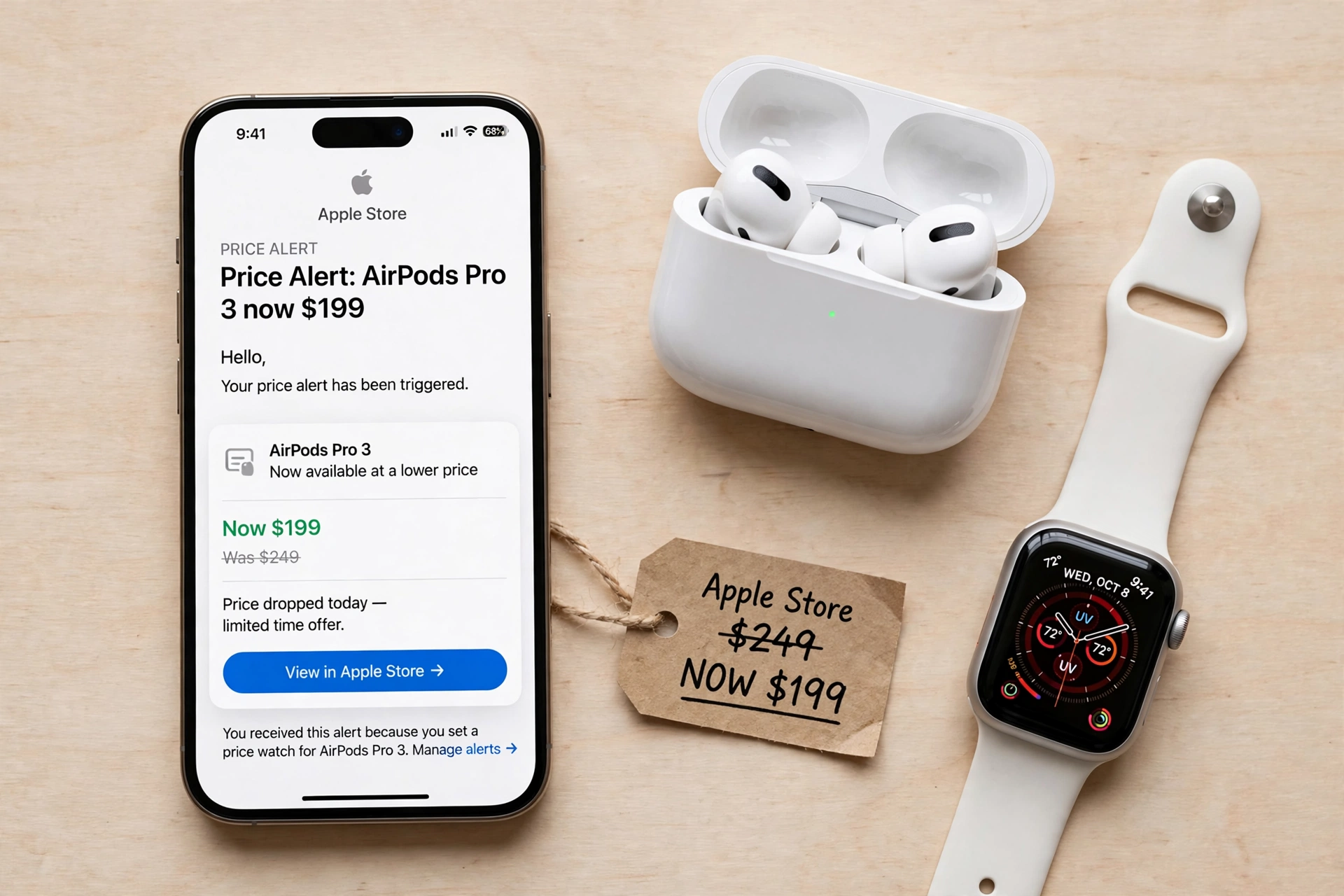
A price alert on iOSGadget does one simple thing: you set a target price on a product page, and the moment a verified store drops to it, the site sends you one email with the merchant and the price. That is the whole job. There is no spam, no daily digest you did not ask for, and no fee. The alert exists so you do not have to check a price every day, and so a genuine discount does not sell out while you are not looking. AirPods and Watch deals sell out fast, so setting the alert early matters more than checking the price on the day itself.
Best deal check
Get the best deal on AirPods Pro 3
Live store prices and real discounts, checked against the official Apple Store price. Tap a store to see the current deal.
The alert works on any product page here. Every product page carries the same promise, in the same words: set a target price, and the moment a verified store drops to it, we send you one email with the merchant and the price. The word verified matters. The alert fires on prices from tracked stores checked against the official Apple Store price, not on any number any seller typed into a listing. A padded was price is not a discount, however large it looks.
How to set one, step by step
Setting an alert takes three steps, and all three are free. First, create a free account. The sign-in page lists what a free account gets you: price alerts, with an email the moment your target price hits; a wishlist, with every product you want and its live prices; deals first, so big verified drops reach members first; and price history, with full charts and the lowest recorded price. Second, open the product page for the exact model and configuration you want: a 46mm Jet Black price is not a 42mm Silver price, and an alert on the wrong configuration fires for a deal you do not want. Third, set your target price on that page. From then on the site watches the price for you, and you do nothing until the email arrives.
When the alert fires, the email names the merchant and the price, so you can go straight to the store and buy. You can remove alerts any time, and there is no penalty for setting several, because each alert tracks one exact model and configuration. If a deal has already landed and the price is already below your target, you do not need an alert at all: the deals page lists every price already verified below its Apple Store price, and you can buy from there straight away. Alerts are for the prices that have not landed yet, which is most of them before a sale.
Picking a target that can actually hit
A target only works if it is genuine, which means grounding it in the Apple Store price for the exact model. Start there, then pick a number below it that a real store could plausibly reach. The verified deals already live on this site show what genuine targets look like. The AirPods Pro 3 have been listed at $199 against a $249 Apple Store price, so a target of $199 or below is genuine for them. The Apple Watch Series 11 GPS 46mm Jet Black has been listed at $379 against $429, so $379 or below is genuine for that exact configuration. The iPad Air 11-inch (M4) has been listed at $699 against $749, and the MacBook Air 13-inch (M5) at $1,149 against $1,299, so targets of $699 and $1,149 are genuine for those models. A target far below every verified price is a fantasy, and an alert set on a fantasy will never fire.
The other mistake is setting the target at the Apple Store price itself. That fires the moment any store lists the product at full price, which tells you nothing, because full price is not a deal. Set the target below the Apple Store price by an amount that would make you buy. Then leave it alone: checking the price every hour defeats the point of the alert. Patience is part of the method, and the method works best when you set the alert a week or more before the sale you are waiting for.
What alerts will not do
Honesty requires saying what alerts cannot do. They cannot promise any specific discount, because no honest site can: stores publish their prices when they choose, and the grid on the Black Friday page fills only as those prices are verified against the Apple Store price. An alert will not make a deal appear, and it will not hold a price for you once it fires: popular models sell out during sale week. If your alert fires, buy then, or accept that the price may be gone when you check again. Prices change, so always check the store price before you buy, and confirm the exact model, size, case and band before you pay.
Alerts also do one thing and one thing only: they send one email. They do not send text messages or push notifications, they do not buy the product for you, and they do not watch prices on other sites for you. What they do is narrow your attention to a single number and tell you the moment it arrives. That is enough, because the most common way people overpay is timing: they check on the wrong day, or buy at full price because they are tired of waiting.
Alerts plus the deals pages
Alerts work best together with the two pages that show verified prices today. The deals page lists only prices already verified below their Apple Store price for the exact configuration, so it is where you buy when the deal is already live. The price drops page shows the biggest verified discounts from recorded price history, so it is where you see which products are actually falling. Use the deals page to buy now, the price drops page to see the trend, and alerts to catch the prices that have not landed yet. Together they cover the whole job: what is cheap today, what is getting cheaper, and what you are waiting for.
Set your alerts this week, while the sale season is still building: pick the exact model, note its Apple Store price, set a genuine target below it, and let the email do the watching. It will not make every deal appear, but it will stop you paying full price for something dressed up as a bargain, and it will catch the real cuts the moment they land. iOSGadget earns from qualifying purchases made through links on this page, at no extra cost to you. Prices change, so always check the store price before you buy.
AirPods Pro 3
Compare live prices before you buy.